

Asset Tag Reporting & Analytics Best Practices
When your asset tracking system is running at full speed, the real magic happens behind the scenes—in the reporting and analytics. While tagging assets with durable labels and tags is essential for visibility, true asset management comes from understanding the data your system generates every day.
From tracking physical assets to forecasting maintenance needs, asset tag reporting and analytics turn information into actionable insight. Whether you’re managing IT equipment, manufacturing tools, or an entire vehicle fleet, knowing how to analyze that data can transform your operations—improving accuracy, reducing cost, and helping you make smarter, faster decisions.
Asset Reporting
Let’s start with the foundation: asset reporting.
An effective reporting process goes beyond simply listing what your organization owns—it shows how those assets are being used, their current status, and where each item is located. When paired with Metalcraft’s durable identification solutions, reporting becomes faster, more accurate, and more insightful.
Metalcraft supports reporting across a full range of asset tags, including: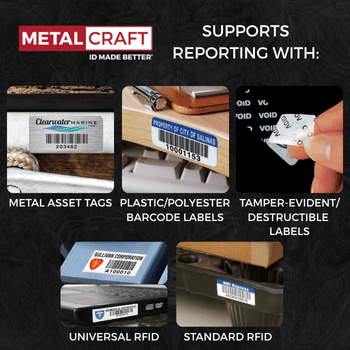
- Metal Asset Tags including metal barcode, foil barcode and color designed serialized nameplates for long-term durability on industrial and manufacturing equipment
- Plastic/Polyester Barcode Labels including Premium Polyester Barcode Labels, Valumark Barcode Labels and ID Advantage Polyester Barcode Labels for clean, professional indoor applications such as IT equipment
- Tamper-Evident and Destructible Labels for environments requiring heightened security and verification
- Universal RFID Tags and Universal Mini RFID Tags for tracking on metal surfaces
- Standard RFID Tags for physical assets made of plastic, wood, or other nonmetallic materials
Each of these tags can be encoded with a unique serial number and linked directly to your asset tracking system, giving your organization real-time access to accurate, actionable data.
A robust asset tag report consolidates key details such as:
- Serial number
- Location
- Assigned department or user
- Purchase date and acquisition cost
- Maintenance history
- Current value or depreciation
- Service schedules and next inspection dates
This reporting framework gives companies the ability to quickly identify missing, underutilized, or misplaced items. It also supports financial accountability and ensures compliance with audit requirements.
For example, a university managing thousands of laptops, lab equipment, and classroom assets can instantly pull a report showing which individual assets are overdue for return or require maintenance—saving hours of manual search time and improving operational accuracy.
Once your asset reporting foundation is in place, the next step is turning that data into meaningful insight through asset analytics—helping your organization not just record information, but use it to make smarter, more strategic decisions.
Asset Analytics
If reporting tells you what’s happening, analytics tells you why and what to do next.
Analyzing asset tags data gives a comprehensive view of how your assets perform, helping companies plan budgets, anticipate downtime, and improve overall asset management.
There are four main categories of analytics used in modern asset tracking systems:
Descriptive Analytics
This is the first layer—summarizing what has already occurred. Descriptive analytics answers questions like:
- How many assets were serviced this quarter?
- Which departments use the most equipment?
- What’s the total value of active assets in the system?
By pulling reports on serial numbers, maintenance schedules, and location changes, users can easily see trends over time. These insights help organizations monitor asset performance and ensure records remain accurate.
Industry Example – Healthcare:
A hospital might use descriptive analytics to track the usage and status of physical assets such as ventilators, infusion pumps, and diagnostic equipment across multiple wings. By viewing monthly utilization reports, staff can identify which machines are most in demand, determine where additional units are needed, and ensure that maintenance is performed on time to prevent service gaps.
Diagnostic Analytics
Once you know what happened, it’s time to determine why. Diagnostic analytics digs deeper into the data to reveal causes and patterns.
For example, if several IT equipment assets require frequent repairs, the data might show that they’re stored in harsh environments or not receiving regular maintenance. Identifying these trends allows companies to plan preventive actions that reduce downtime and cost.
Industry Example – Manufacturing:
A manufacturing plant might find that a particular production line’s machines have a higher failure rate. Diagnostic analytics could reveal that these assets operate longer shifts or lack consistent lubrication schedules. With this information, the facility can adjust its process, improving reliability and reducing maintenance expenses.
Predictive Analytics
Predictive analytics uses historical data to forecast future events—helping organizations determine what’s likely to happen next.
By tracking maintenance intervals, usage history, and location, systems can predict when equipment will require service. This proactive approach extends asset life and saves both time and money.
Industry Example – Logistics:
A distribution company might use predictive analytics to forecast when delivery vehicles will need tire replacements or inspections. Using RFID tags and sensor data, the system predicts wear patterns and automatically schedules service before breakdowns occur—keeping routes on time and ensuring assets stay secure and operational.
Prescriptive Analytics
The most advanced stage of analytics, prescriptive tools don’t just predict—they recommend.
These systems use data from tags, sensors, and reporting dashboards to create optimized maintenance schedules, reassign underused assets, and secure sensitive equipment automatically.
Industry Example – Information Technology:
An IT department might use prescriptive analytics to analyze data from asset tags on laptops and servers across multiple offices. If certain individual assets sit idle for extended periods, the system can recommend reassigning them to other departments or users, improving resource utilization and reducing unnecessary acquisition costs.
Metalcraft’s Asset Tag Reporting
Accurate asset tag reporting depends on two things: reliable data and the tools that capture it. That’s where the right identification technology plays a vital role. Metalcraft’s decades of experience in tagging assets has helped organizations across industries build stronger, more accurate asset tracking systems that keep information consistent, traceable, and secure.
From rugged metal barcode labels used in manufacturing and field operations to advanced RFID tags deployed in logistics, healthcare, and IT environments, Metalcraft designs tags that stand up to the conditions they’re used in. Each tag features a unique serial number—the foundation of every asset report—and can be pre-encoded or custom-programmed to integrate directly with a company’s asset tracking system or asset management software.
Because every asset tag contributes to larger reporting and analytics processes, durability and precision matter. Metalcraft’s range of identification solutions ensures that your tracking data re
mains consistent, whether tags are exposed to harsh environments, mounted on metal surfaces, or scanned in clean rooms.
When integrated into your asset management workflow, Metalcraft’s tags enable organizations to:
- Generate comprehensive reports with consistent identifiers across all assets
- Monitor the status, location, and condition of individual assets in real time
- Maintain a full maintenance history and ensure service records stay accurate
- Verify ownership, assignments, and departmental accountability
- Support audit readiness through organized, accessible data
Behind these capabilities is Metalcraft’s advanced serialization engine—a system developed to maintain a unique numbering structure for every tag ever produced. This ensures there are no duplicate serial numbers, even across jobs, parts, or years of production. For customers, that consistency translates into cleaner reporting, easier data access, and reliable lifecycle visibility for every asset in their database.
Metalcraft also supports both UHF and HF RFID programming, offering unmatched flexibility for different applications. Whether you need basic one-to-one matching between printed barcodes and RFID encoding or complex, proprietary data structures, Metalcraft’s programming options provide the foundation for scalable, integrated reporting.
To make reporting even more efficient, every RFID order includes an electronic association file—linking printed identifiers to their corresponding encoded values. This file can be uploaded directly into asset tracking systems or asset management software, simplifying setup and integration while minimizing manual entry errors.
At its core, Metalcraft’s approach to asset tag reporting is about enabling better data-driven decisions. By combining durable identification materials with precise encoding and thoughtful process design, Metalcraft helps companies ensure their assets—and the information that defines them—remain accurate, traceable, and ready to support the next step in analysis.
Getting the Most Out of Your Asset Tag System
A successful asset tracking system isn’t just about applying tags—it’s about creating consistent processes for reporting, analysis, and maintenance. Let’s break down how to maximize the benefits of your system.
| Step | Description |
|---|---|
| Setting It Up | Determine what materials fit your environment and what features are the most important to you. |
| Data Entry | Ensure that you have accurate data while you are entering asset details. Barcode scanners/RFID readers assign tags automatically and minimize errors. |
| Tagging | Physically apply your asset tags to all critical physical assets, like IT equipment and machinery. |
| Analysis | Monitor asset status, maintenance and movement across sites to gain insights into resource allocation and waste reduction. |
1. Setting It Up
Start by defining clear processes for tagging assets and entering data.
Determine which materials and tags best fit your environment—metal, plastic, or hybrid—and which features are most important (for example, barcode visibility or RFID readability).
Each tag should have a defined format for serial numbers and data fields, ensuring consistency across all departments. Choosing durable materials from the start helps secure your assets and reduces long-term costs.
2. Data Entry
Accurate data is the foundation of every great report. When entering asset details, include:
- Serial number and model
- Purchase value and acquisition date
- Assigned department and location
- Maintenance intervals and service provider
- Current status and condition
Many companies use barcode scanners or RFID readers to assign tags automatically and minimize errors. This ensures data stays accessible, consistent, and secure across systems.
3. Tagging
Next comes the physical tagging. Apply asset tags to all critical physical assets, including IT equipment, machinery, furniture, and vehicles.
For harsh environments, choose durable materials like anodized aluminum or polyester labels that withstand temperature and chemical exposure. Proper placement is key—choose visible, scannable areas that won’t interfere with normal service or usage.
Each tag links directly to a serial number in your system, providing a digital fingerprint for individual assets.
4. Analysis
Once the tagging and data entry are complete, it’s time for analysis. Regularly monitor asset status, maintenance, and movement across sites. Use reporting dashboards to identify underutilized assets, plan repairs, and forecast depreciation.
Companies that consistently analyze their asset tracking systems gain insights into how to allocate resources efficiently and reduce waste. Over time, this process enhances asset management and contributes to measurable cost savings.
Benefits of Reporting
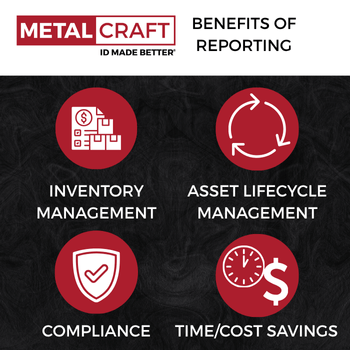
Robust asset reporting and analytics provide measurable advantages that go far beyond recordkeeping. Accurate, timely data helps organizations make informed decisions, improve efficiency, and strengthen accountability across departments.
Inventory Management
Accurate reporting streamlines inventory management by showing what’s available, where it’s located, and how it’s being used. In logistics, for instance, barcode and RFID tags allow teams to instantly locate pallets, containers, or vehicles—reducing manual search time and keeping assets moving efficiently through the supply chain.
Asset Lifecycle Management
Every asset moves through a defined lifecycle—from acquisition to maintenance and eventual retirement. In manufacturing, detailed reporting helps track machine usage and maintenance history, allowing teams to determine optimal replacement schedules and extend the value of expensive production equipment.
Compliance
For regulated sectors like healthcare, precise asset reporting supports security, accountability, and compliance. Durable Metalcraft tags and labels ensure that physical assets like medical devices remain traceable and verifiable during audits, even in harsh environments or high-traffic facilities.
Time and Cost Savings
Automating reporting reduces administrative work, lowers cost, and minimizes human error. In information technology, integrated barcode or RFID systems enable quick updates on IT equipment status—cutting hours of manual tracking while freeing staff to focus on more strategic, higher-value work.
Conclusion
Accurate asset reporting turns raw data into actionable insight, improving efficiency and accountability across your organization. With durable barcode and RFID tags, Metalcraft helps companies track, analyze, and protect their assets with confidence. Contact Metalcraft to learn how better reporting begins with better tagging.
About the Author: Kathleen Phillips

Mobile Phone: 641-423-9460
Office Phone: 641-423-9460
Email: [email protected]
Office: 3360 9th St SW, Mason City, IA 50401