

If your organization depends on accurate asset tracking, then properly applying asset tags is not optional—it’s essential. Whether you’re managing tools, equipment, vehicles, or high-value fixed assets, poorly applied labels can lead to lost asset data, inefficient operations, and increased replacement costs.
Many businesses invest in high-quality custom asset tags, barcode tags, or even advanced RFID tags, but overlook one critical factor: proper application. Even the most durable asset label will fail if it’s not applied correctly.
So how can your team ensure long-lasting, effective asset tags that support your full asset management strategy?
Below are three proven tips to help you apply asset tags the right way—so your asset tagging system remains reliable for years to come.
1. Clean the Surface Before You Apply Asset Tags
The foundation of successful asset tagging starts with surface preparation.

Before you apply any labels or tags, the surface must be completely clean and dry. This step is critical because contaminants can interfere with adhesive bonding, causing asset tags to peel, bubble, or fall off prematurely.
Common contaminants include:
- Oil and grease from machinery
- Dust and dirt from the environment
- Moisture or condensation
- Wax, mold, or residue from cleaning products
If these elements are present, your asset tagging works will fail over time, reducing the reliability of your tracking solution.
Best Practices for Surface Preparation
To ensure proper adhesion:
- Use a cleaning solution appropriate for the material (metal, plastic, painted surfaces, etc.)
- Wipe thoroughly and allow the surface to dry completely
- Avoid applying tags in humid or dirty environments
This step is especially important when tagging physical assets in industrial settings, warehouses, or outdoor environments where exposure to harsh conditions is common.
A clean surface ensures your customizable labels, whether they include QR codes, traditional barcodes, or embedded RFID tags, remain readable and secure for long-term asset tracking.
Skipping this step can lead to inaccurate inventory, poor visibility, and additional labor costs as employees must reapply or replace damaged tags.
2. Handle Asset Tags with Care
Once the surface is clean, the next step is proper handling.
The adhesive backing on most asset tags is pressure-sensitive and designed to create a strong bond—but only if it remains uncontaminated. Touching the adhesive with your fingers, tools, or other surfaces can reduce its effectiveness before it even reaches the asset.
Why Handling Matters
Even small amounts of oil or dirt from your hands can compromise adhesion. This leads to:
- Reduced bonding strength
- Increased risk of edge lifting
- Shorter lifespan of the asset label
To maintain the integrity of your custom asset tags, always handle them by the edges and avoid contact with the adhesive side.
This is particularly important when working with:
- High-performance tags used in rugged environments
- RFID tags that require precise placement for optimal read performance
- Labels used in fixed asset management systems
Supporting Your Asset Management System
Proper handling ensures that your asset tagging system functions as intended. When tags remain secure and readable, your asset management software can accurately track:
- Serial numbers
- Location of individual assets
- Usage history and maintenance schedules
- Audit history for compliance and accountability
Whether your team uses a mobile device with a mobile app for barcode scanning, or a web based platform for centralized tracking, proper tag handling ensures reliable data collection across your entire organization.
3. Apply Asset Tags with Firm, Even Pressure
After preparing the surface and handling the tag correctly, the final step is application.
To achieve a strong bond, apply the asset tag using firm, even pressure across the entire surface. This ensures the adhesive fully contacts the asset and eliminates air pockets that can weaken the bond.
Key Application Tips
- Press firmly across the entire asset label
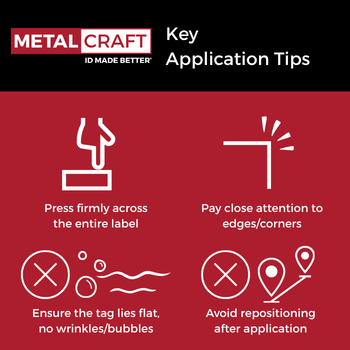
- Pay close attention to edges and corners
- Ensure the tag lies flat with no wrinkles or bubbles
- Avoid repositioning once applied
A properly applied tag should feel secure and fully adhered to the surface.
Allow Time for Adhesive Cure
One of the most overlooked aspects of proper application is cure time. Adhesives need time to fully bond with the surface.
For best results:
- Allow at least 72 hours before exposing the asset to harsh conditions
- Avoid washing, heavy handling, or chemical exposure during this time
- Apply tags when the surface temperature is above 50°F
This is especially important for equipment, vehicles, and tools used in demanding environments.
By allowing proper cure time, your asset tags will maintain long-term durability, supporting accurate inventory and reducing replacement costs.
Why Proper Asset Tag Application Matters
Applying asset tags correctly has a direct impact on your entire asset management strategy.
When tags fail, the consequences go beyond replacing a label. Your business may experience:
- Lost or inaccurate asset data
- Reduced visibility into asset status and location
- Inefficient operations due to manual tracking
- Increased costs from misplaced or untracked assets
On the other hand, properly applied asset tags enable your team to:
- Quickly identify and track individual assets
- Maintain accurate records in your asset management software
- Generate powerful reports for decision-making
- Improve accountability across employees and departments
Whether you’re managing a small inventory or a large-scale enterprise system, consistent application practices ensure your asset tagging system remains reliable.
Supporting Modern Asset Tracking Technologies
Today’s asset tracking solutions go beyond simple labels. Businesses now use a combination of technologies to improve efficiency and data accuracy.
These include:
- Barcode tags and traditional barcodes for cost-effective tracking
- QR codes for easy scanning with a mobile device
- RFID tags for automated, long-range tracking
- Customizable labels with custom fields for essential information
When properly applied, these technologies integrate seamlessly with:
- Asset management software
- Asset tagging software
- Web based platforms with full featured plans
- Mobile tools that allow employees to update data in a timely manner
This creates a complete tracking solution that helps businesses manage assets, monitor usage history, and maintain accurate records across all locations.
Real-World Examples of Effective Asset Tagging
Consider a company managing hundreds—or even thousands—of physical assets across multiple locations.
Without proper tagging:
- Equipment may be misplaced or underutilized
- Maintenance schedules may be missed
- Inventory counts may be inaccurate
With properly applied asset tags, however, the organization can:
- Track assets in real time
- Monitor quantity and status
- Improve maintenance planning
- Reduce unnecessary purchases
From manufacturing facilities to healthcare organizations, effective asset tagging improves efficiency, reduces costs, and enhances overall management.
Final Thoughts
Taking the time to properly apply asset tags is one of the simplest yet most impactful ways to improve your asset management process.
By following these three key steps—cleaning the surface, handling tags carefully, and applying firm pressure—you can ensure your asset tags remain secure, readable, and effective for years.
When combined with the right tools, software, and asset tagging system, proper application helps your business:
- Maintain accurate asset data
- Improve operational efficiency
- Enhance accountability across your team
- Deliver better results for your customers
If you’re looking for durable custom asset tags, high-performance RFID tags, or a complete asset tracking solution, Metalcraft offers products designed to meet the needs of modern businesses.
Have questions or need help selecting the right solution? Contact our team to learn more about how we can support your asset management goals.
About the Author: Marianne Alvarado

Mobile Phone: 641-529-9492
Office Phone: 641-423-9460
Email: [email protected]
Office: 3360 9th St. SW, Mason City, IA 50401